



As conversational AI shifts from chat-first to voice-first interfaces, platforms like Pipecat need robust, low-latency, and telco-grade infrastructure to carry audio between customers and bots in real time. This is where Exotel’s AgentStream Infrastructure comes in, delivering real-time audio from PSTN/SIP to your bot with guaranteed reliability and enterprise-grade uptime.
The exotel.py serializer in Pipecat is a production-grade module that enables developers to consume and send Exotel WebSocket-based audio in real time, handle DTMF events, and orchestrate voice sessions for scalable AI conversations.
What is This File?
This file exotel.py implements a custom FrameSerializer that bridges Exotel’s real-time media stream events with Pipecat’s internal audio frame architecture. It supports:
- Media Event Deserialization (Exotel → Pipecat)
- Audio Resampling to match sample rate between bot and Exotel (default: 8000 Hz; supports 16kHz/24kHz upsampling/downsampling)
- Clear Event Handling (StartInterruptionFrame → {event: clear})
- Media Event Serialization (Pipecat → Exotel)
- DTMF Deserialization
Supported Event Flow (Exotel ↔ Pipecat)
| Exotel Event | Pipecat Frame | Direction | Notes |
| start | StartFrame | Exotel → Bot | Implicitly handled via setup |
| media | InputAudioRawFrame | Exotel → Bot | Uses PCM payload in base64 |
| dtmf | InputDTMFFrame | Exotel → Bot | Decodes digit to KeypadEntry |
| StartInterruption | clear event JSON | Bot → Exotel | Tells Exotel to clear context |
| AudioRawFrame | media event JSON | Bot → Exotel | Audio stream to customer |
| TransportMessage* | JSON message passthrough | Bot → Exotel | For metadata/custom routing |
How This Works
When integrated into your voicebot runtime:
- Incoming Events: The WebSocket handler receives JSON packets from Exotel, such as {event: media, …}. These are deserialized to Pipecat-native frames.
- Outgoing Frames: When the bot responds with AudioRawFrame, the serializer resamples audio and wraps it into an Exotel-compatible media event.
- Call Termination: StartInterruptionFrame (e.g., triggered on no intent match or disconnect) is translated into a clear event to gracefully close the Exotel stream.
Inbound AgentStream Setup (Customer → Bot)
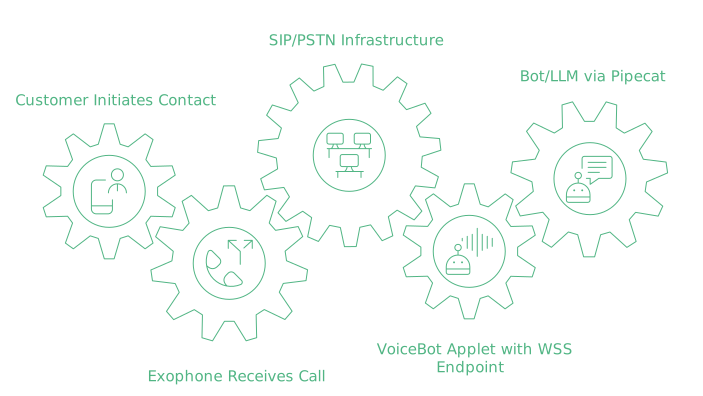
→ Customer → Exophone (Exotel Number)
→ SIP/PSTN Infra
→ VoiceBot Applet with WSS endpoint
→ Your Bot / LLM (via Pipecat)
📘 Reference: Working with Stream and Voicebot Applet
Outbound AgentStream Setup (Bot → Customer)
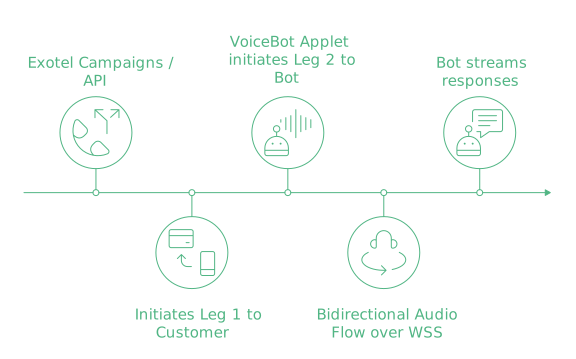
→ Exotel Campaigns / API
→ Initiates Leg 1 to Customer
→ VoiceBot Applet initiates Leg 2 to Bot (WSS)
→ Bidirectional Audio Flow over WSS
→ Bot streams responses
📘 Reference: Connect API and AgentStream Services
Best Practices for Real-Time Bots
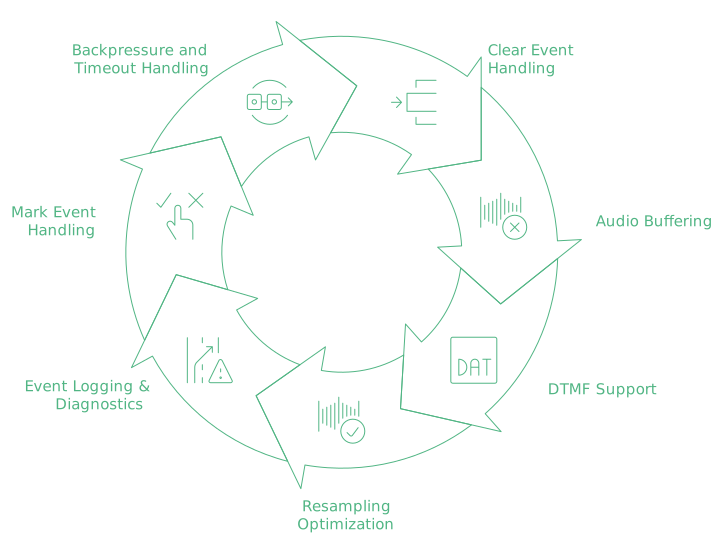
1. Clear Event Handling
Ensure that your bot sends StartInterruptionFrame (mapped to {event: clear}) when it needs to reset or exit the stream, e.g., after hang-up or fallback.
2. Audio Buffering
Implement frame-level buffering before responding with AudioRawFrame to avoid partial audio or glitches. Suggested buffer duration: 200–300ms.
3. DTMF Support
The deserializer maps digits into InputDTMFFrame. Ensure you map these to correct bot intent or context switching flows.
4. Resampling Optimization
Exotel streams 16-bit mono PCM at 8000 Hz. Resample it up to 16kHz or 24kHz for whichever ASR/TTS backend you run, using Pipecat’s create_stream_resampler() method, then step it back down to 8kHz before the frames go out over the WebSocket. This ensures audio fidelity.
5. Event Logging & Diagnostics
Log each WebSocket event, audio payload sizes, round-trip latency, and stream SIDs. Use structured logs to trace real-time performance and reliability.
6. Mark Event Handling
Though not always used, your bot can implement logic to handle mark events (if supported), which act as checkpoints for actions like interruptions, confirmations, or analytics tagging.
7. Backpressure and Timeout Handling
Ensure your bot server handles flow control (backpressure) using asyncio.Queue or non-blocking buffers to avoid socket timeout or audio lags.
TL;DR: Why This Matters
Building production-grade voicebots means going beyond basic transcription. You need:
- Reliable audio ingress from Telco infra
- Real-time streaming to/from your bot
- Precise control over when to listen, speak, or reset
- Seamless fallback/escalation
- Predictable barge-in behaviour when the caller speaks over the bot
- Per-call diagnostics: stream SIDs, payload sizes, and latency you can actually trace
This Pipecat Exotel serializer helps bridge that gap—letting you plug into India’s most enterprise-grade voice infra while using your own AI stack (LLMs, ASRs, or NLU engines).
Start Using This Today
Supported Use Cases
- Lead Qualification Bots (click-to-call + bot driven)
- Inbound IVR Automation (customer dials your number, bot handles intent)
- Outbound Campaign Automation (Exotel Campaigns + VoiceBot Applet)
- Collections & Reminders Bots
- Support Deflection with Agent Escalation
Next Steps
- Clone Pipecat
- Add your WebSocket URL in Exotel’s Voicebot Applet
- Implement custom frame handlers for Start → Media → DTMF → Stop
- Use the exotel.py serializer in your bot runtime
- Monitor session logs & test with both inbound and outbound flows
FAQs
What audio format does Exotel send to Pipecat?
Base64-encoded 16-bit linear PCM, mono, at 8000 Hz, carried inside the media event payload. The serializer decodes it into InputAudioRawFrame and hands it to your pipeline.
Do inbound and outbound calls need different serializers?
No. The same exotel.py serializer handles both. What changes is how the call starts: an Exophone dial for inbound, a Connect API or campaign trigger for outbound. Once the VoiceBot Applet opens the WebSocket, the frame flow is identical.
What endpoint do I need to expose?
A publicly reachable wss:// URL with a valid TLS certificate, configured in the Voicebot Applet. Plain ws:// and self-signed certificates will not connect.
How do I stop the bot mid-sentence when a caller interrupts?
Emit StartInterruptionFrame. The serializer converts it to {event: clear}, which tells Exotel to drop any audio still queued for playback so the caller hears the bot stop almost immediately.
Can I keep call recordings from these sessions?
Yes. Recordings are fetched through a signed URL rather than a permanent public link, so the file stays access-controlled.
📘 Explore:
- Exotel AgentStream Setup Video
- Voicebot Applet Documentation
- Quick Start Guide
- Connect API
- Signed URL for Recordings