Enterprise voice,
built into Salesforce
Put customer context behind every call. Connect Exotel to Salesforce for unified calling and Agentforce-powered voice.










Make every voice interaction in Salesforce count.
Get deeper context and faster resolutions on every Salesforce call without ever switching tabs.
Handle calls straight from Salesforce
Manage every customer conversation inside Salesforce with full context on screen.
Smarter Agentforce conversations
Resolve routine inquiries autonomously using past customer context.
Single unified customer record
Store past conversations and activity history under a single customer record.
Plug into your existing stack
Connect your existing workflows effortlessly with Exotel.
Choose how you connect voice in Salesforce.
Explore how Exotel brings calling and AI voice into Salesforce.
Partner Telephony
(BYOT)
Bring Exotel calling directly into Salesforce so your team can make and receive calls without switching tabs. Every conversation stays connected to live customer profiles, call history, and automated workflows.
Virtual SIP (vSIP)
for Agentforce Voice
Connect Exotel's voice infrastructure directly to Salesforce to power Agentforce Voice. AI agents gain real-time access to CRM records and workflows, delivering smarter, context-aware customer conversations.
| Partner Telephony (BYOT) | vSIP connector for Agentforce Voice | |
|---|---|---|
| What it does | Puts Exotel calling inside Salesforce. Agents place and receive calls without leaving the CRM. | Connects Exotel's network to Agentforce Voice, so an AI agent answers calls with your customer context. |
| Who answers | Your human agents | An Agentforce AI agent, handing off to your team when needed |
| Best for | For sales and service teams that live in Salesforce | For AI-first service teams with high call volumes and 24x7 coverage |
| What you need in Salesforce | Service Cloud Voice with Partner Telephony | Agentforce and Agentforce Voice |
| How Exotel connects | Telephony Integration API | SIP over TLS with SRTP audio |
How it connects
Exotel carries the call. Salesforce handles routing, AI and customer data.
Integration workflow
Calls enter on Exotel numbers, or from your own contact center, and reach Salesforce through one of the two connectors.
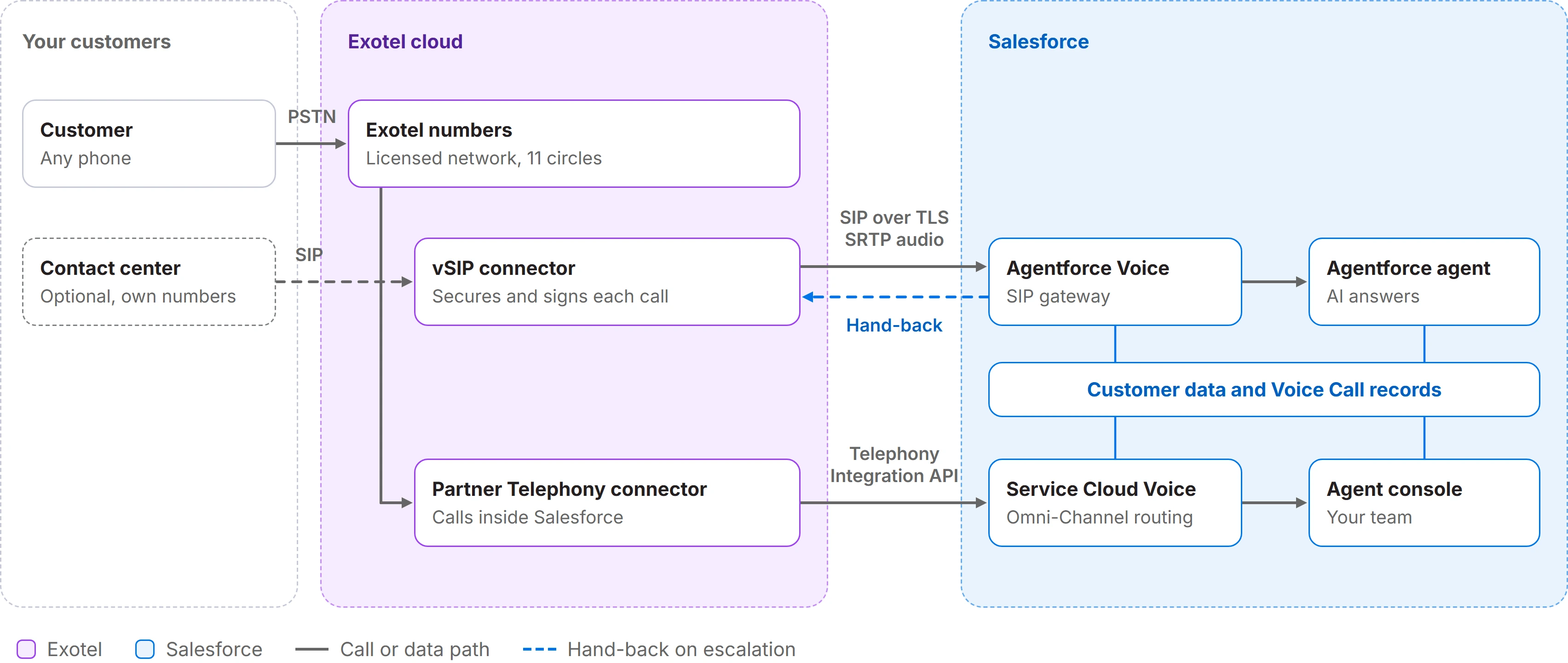
Secure by default
Calls to Agentforce use SIP over TLS and encrypted SRTP audio. Each call carries a signed token that Salesforce verifies.
One record per call
Exotel creates and updates a voice call record in Salesforce, so every conversation sits next to the customer.
No dropped hand-offs
When the AI agent escalates, Exotel keeps the caller on the line and routes them to your team.
Set up in four easy steps
Our team sets up the connection and works with you at every step until your first live call.
- 1
Choose your connector
Select Partner Telephony, Agentforce Voice, or both, and assign your numbers.
- 2
Connect your org
Exotel sets up your numbers on its licensed network, the secure connection to Salesforce, and your org certificate.
- 3
Configure Salesforce
Set up your agent, routing flows, and Exotel channel, and choose the queues your team works, using our step-by-step guide.
- 4
Test and go live
Test answers and handoffs with one call, then go live.
Technical specifications
Security, connectivity and call records at a glance.
| Signalling | SIP over TLS |
|---|---|
| Media | SRTP-encrypted audio, G.711 (PCMU) |
| Call authentication | Signed token (RS256 JWT) in a hex-encoded User-to-User header, verified against the certificate registered in your Salesforce org |
| Escalation | Salesforce ends its leg with SIP BYE. Exotel keeps the caller and routes onward |
| Call records | Voice Call record created and updated through the Salesforce Telephony Integration API |
| Numbers | Exotel numbers, or your contact center's own numbers bridged through Exotel |
| Network | UL-VNO licensed, 11 telecom circles in India, built to 99.99% uptime |
Ready to connect Exotel with Salesforce?
Book time with us, and our team will walk you through the setup.


Frequently asked questions
Does Exotel integrate with Salesforce?
Yes. Exotel connects to Salesforce through two connectors: Partner Telephony (BYOT) for calling inside Salesforce, and Virtual SIP (vSIP) for Agentforce Voice.
Does Exotel work with Agentforce?
Yes. The vSIP connector links Exotel's telephony to Agentforce Voice, so an Agentforce AI agent answers calls with your customer context.
How easy is it to set up?
Setup takes four steps. Exotel sets up your numbers and the secure connection, and your admin configures Salesforce using our step-by-step guide.
Do I need my own SIP trunk or telecom provider?
No. Exotel provides the numbers, the licensed network and the secure connection to Salesforce.
Can I keep my existing contact center?
Yes. Your contact center keeps its numbers and sends calls to Exotel. Exotel bridges them to Agentforce, and escalated calls return to your agents.
What happens when the AI agent can't help?
Agentforce escalates, and Exotel routes the customer to your team without dropping the call.
Is it secure and compliant?
Calls use SIP over TLS with SRTP-encrypted audio, and each call carries a signed token that Salesforce verifies. Exotel operates as a UL-VNO licensed telecom operator in India.
What do I need in Salesforce?
Service Cloud Voice for Partner Telephony, or Agentforce and Agentforce Voice for the AI agent. Your Salesforce account team can confirm licensing.
Salesforce, Agentforce and Service Cloud Voice are trademarks of Salesforce, Inc.